Flashback Express 7
User Manual
Downloading and Installing
Recording a Video
Recorder Window
Recorder Settings
Recording the Mouse Cursor
Starting and Stopping Recording
Recorder Control Bar
Advanced Recording Options
Annotating While Recording
Selecting What To Record
Recording on a computer with dual GPUs
Previewing a Recording
Editing a Project
Editing Basics
Navigating the Project Editor
Working with Media
The Timeline
The Video Canvas
Styling Media
Editing Preferences
Exploring Media
Videos
Images
Animations
Shapes
Backgrounds
Text
Titles
Audio
Voiceovers
Subtitles
Blurs
Flashback Pro Movies
Applying Effects
Exporting
Freeze Frame
Licensing Flashback Express 7
Free vs Licensed Use
Purchasing a Flashback Express 7 License
Registering a Flashback Express 7 license
Upgrading From Pro 5 or Express 6
Feature Credits
Flashback Connect
Managing Your Subscriptions
Registering on an offline PC
Deploying a license to multiple PCs
License Troubleshooting
Misc.
How To Guides
Make a clip from a recording
Replace a voiceover
Record a facecam video
Schedule a recording session
Highlight the mouse cursor
Edit audio for an imported video
How To Move a Project to a New Computer
Record a clear voiceover
Flashback Express 7 Quick Start Guide
Flashback Express 7 FAQs
Flashback Express 6
User Manual
Downloading and Installing
Getting Setup to Record
The Recorder Window
Recording the Screen
Recording Windows and Regions
Recording Sound
Recording a Webcam
Recording the mouse cursor
Recording Settings
Recording
The Recorder Control Bar
Starting, Pausing and Stopping a Recording
Discarding or Restarting a Recording
Saving your recording
Scheduling a recording
Auto-trimming
Editing and Uploading
The Video Window
The Edit & Upload Window
Making a Clip
Uploading a Video
Exporting to other formats
Exporting Audio
Adding Subtitles
Licensing
Flashback Express Free vs Licenced
Purchasing a Flashback Express 6 license
Registering a Flashback Express 6 license
Registering Flashback Express 6 on an offline PC
Deploying a Flashback Express 6 license to multiple PCs
Flashback Express License 6 Troubleshooting
Feature Credits for Transcrptions
Misc.
How To Guides
How to record a facecam video
How to make a clip
How to schedule a recording session
How to capture the mouse cursor
Flashback Express 6 Quick Start Guide
Flashback Express 6 FAQs
Camigo
User Manual
Getting Started
Camigo System Requirements
Downloading and installing
Setting up Camigo
Checking for Updates
Camigo Settings
Using Camigo
Customizing your video
Licensing
Support
Camigo Quick Start Guide
Camigo FAQs
Video Converter
User Manual
Getting Setup
Video Converter System Requirements
Downloading and installing Video Converter
Preferences
Free Trial
Using Video Converter
Converting Format
Format settings
Turbo Conversion
Creating Clips
Cropping a video
Applying Effects
Adding Watermarks
Changing Speed
Inserting Subtitles
Licensing Video Converter
Video Converter Quick Start Guide
Video Converter FAQs
Table of Contents
- All Categories
- Flashback Express 7
- User Manual
- Licensing Flashback Express 7
- Flashback Connect
Flashback Connect

Flashback Connect is Flashback's dedicating hosting platform, which Flashback licence owners can upload to in order to share their videos with others.
When the Flashback Connect option is selected in the Export menu, the video will automatically upload to the Connect account associated with your Flashback Express licence. If you do not have a Connect account yet, videos will upload to a free Guest account.
Upload Limits
Licence owners can have up to 3 videos shared to a Guest account on Flashback Connect at any one time. Any videos that have already been uploaded, can be deleted to make space for a new video to be uploaded in their place.
A monthly Flashback Connect subscription can be added to your Flashback Express licence as an optional extra to allow up to 100 videos to be hosted instead of the basic number of 3.
Managing Flashback Connect uploads
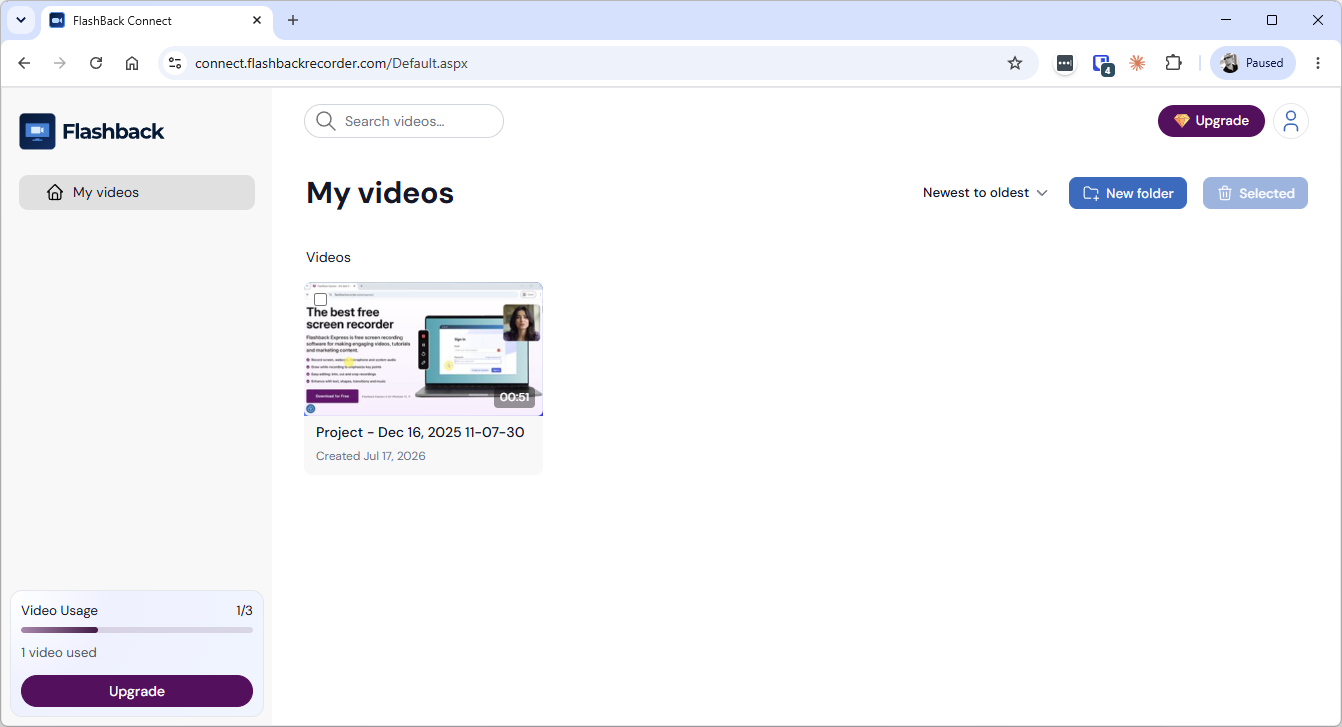
You can view and manage the videos that you have uploaded to Flashback Connect by clicking the Flashback Connect option in the top right corner of the Videos window, which will open your Connect account in your web browser.
From within your account, you can view and delete your uploaded videos, as well as configure sharing, get embed codes and re-download them. See Sharing Flashback Connect Uploads for more details about sharing and embedding.
Purchasing a Flashback Connect subscription
A Flashback Connect subscription can be added by viewing your Guest account at https://connect.flashbackrecorder.com/ and then clicking either of the Upgrade buttons, which will open the checkout page for your subscription purchase. Once checkout is completed, your Guest account will immediately be upgraded to your new Flashback Connect subsciption.
Alternatively, if you try to upload a new video while aleady at your Guest upload limit, an Upgrade message will appear, which will also open the checkout page to purchase a subcription.
Managing a Flashback Connect subscription
You can manage your subscription via your Flashback account at https://account.flashbackrecorder.com/Login.aspx.
See Managing Your Subscriptions for more details.